









Complete Application Makeover. Transform every window in your Clarion app with wallpapers, graphic buttons, custom fonts, and runtime themes . Applied globally with one template.
Overview
Your Clarion application is powerful, but does it look the part? FinalStep is a single global template that transforms your entire application’s appearance at once . No need to skin every window individually.
Works at design time AND runtime. You control the global look during development. And if you choose, your end users can customize fonts, colors, and themes at runtime . No extra code required.
37 button sets and 15 wallpapers are included out of the box, all in high-quality GIF format (with BMP originals in a separate installer so you can create your own).
The result? Clients who expect a modern, polished application see your app transformed. As one developer put it: “When I present the install the application has FinalStep in it and their jaws drop and their eyes get big.” That’s the FinalStep difference.
Features
-
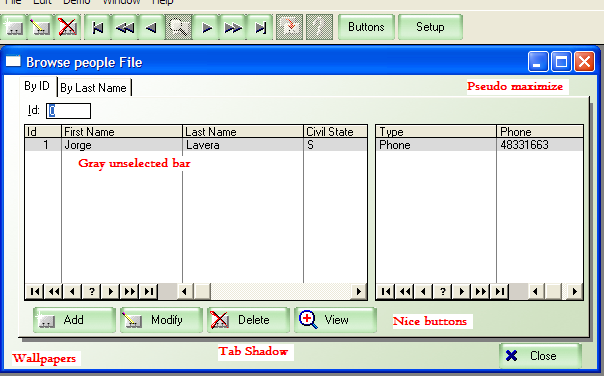
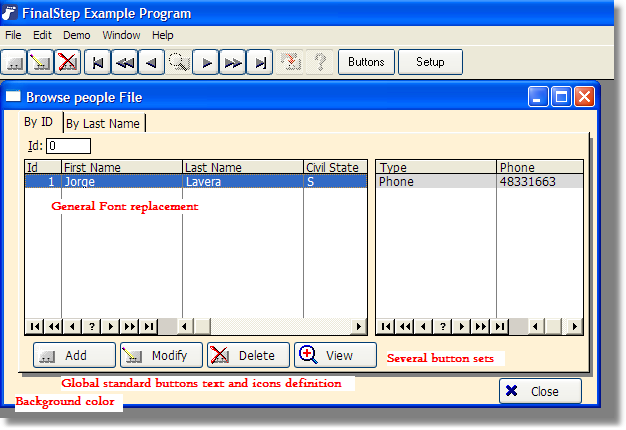
 Replace the standard buttons by any fancy graphic you like (See Buttons). Several sets of buttons are supplied.
 - You may define if you want borders for them (you can set their color, thickness and if their corners are rounded).
- Define globally the wallpapers and its mode (stretched, tiled or centered). You may set different wallpapers for Browses, Forms, Toolbar and rest of the windows.
- A cool feature, your program may pick a "random" wallpaper for the main Frame. A beautiful collection of landscape photographs are supplied.
- As an alternative, a plain color as background for all the windows where there is no wallpaper set. Also, you may globally set the color of the listboxes background.
- You may set the Font for all the windows, with the option of locking the font for "entry” fields so if the user pick an OpenType in a LCD panel, the entry fields are still legible.
- You can set a mouse pointer for all your buttons.
- You can also set the Transparent and Flat status of your buttons and other controls.
- You may change globally at design time the text, size and icons for the standard buttons (ok, cancel, select, etc.)
- The selection bar for the browse can be set to change it color when the list is not in focus.
- To improves the final user feedback, you may specify that the OK button in the form change its text according to the form function (as in Accept, Save changes, Delete) and when called for “View”, it can have only one button (like “Close”) which is by the way the Cancel button, and the ok one is hidden. Also, in Browses you can have the “close” button replaced by “cancel” when the browse is called as lookup.
- Replace standard maximize behaviour with our pseudo-maximize function (which resizes any window to fit the Frame), so your user don't have to suffer all the "maximize window" problems.
The template is supplied with installer, example program, PDF reference, and libraries of buttons and wallpapers.
You get 15 wallpapers and 37 buttons sets (so far), all of them in high quality, high speed display GIF format, and also supplied in original BMP format as a separate installer so you can derive your own graphics if you want.
All the functions are supplied as extension, control templates or code templates. The Example program (available as demo, compiled with Clarion 5.5) has almost no code added inside it.
Global Template Capabilities


Read the documentation on-line here.
Compatibility
(Release date)
Secure payment via PayPal or bank transfer. View all payment options.
Notes:
Initial purchase price includes 1 year of revisions, upgrades and support.
Support is given for the last patch of each Clarion versions.
If you have questions, we will be pleased to answer. Just contact us.
Not sure yet? Read what others say
"FinalStep is a very nice product and works very well. Easy to use too!" - Drew Bourrut (Performance Support, Inc) (USA)
"FinalStep is amazing! I wished I had bought it a long time ago. Simple to apply and use. It's very nice to change the overall look of my apps with the click of a button. Surprising to, that it's as cheap as it is." - Donald Ridley (USA)
"Here is a little bit of information on how I use FinalStep. As I go through
my development cycle I leave FinalStep out. I present the near gold code
version to the client. They go through the functionality such as browsing,
queries and reports etc. I then lock the feature set and show them Gold
code.
When I present the install the application has FinalStep in it and their
jaws drop and their eyes get big. I tell them it is just the last bit of
polish that I add to give them the best looking product I can. They are
always amazed and FinalStep really increases the value of my applications.
An application isn't finished until you've added that Final Step.
You are very welcome Jorge. Thanks for a great product." - Darren Hans Bobella aka DB (USA)
FinalStep downloads

Serial number required. You will receive it by email after purchasing. (Note, try your last serial code before purchasing a new one!)
Free download of compiled example (Compiled with Clarion 11 Gold).
Serial number required. You will receive it by email after purchasing.
Serial number required. You will receive it by email after purchasing.
Serial number and maintenance code valid until 12 April 2008 required.
Serial number and maintenance code valid until 22 October 2007 required.
Serial number and maintenance code valid until 7 September 2007 required.
Serial number and maintenance code valid until 24 July 2007 required.
Serial number and maintenance code valid until 28 May 2007 required.
Serial number and maintenance code valid until 15 March 2007 required.
Serial number and maintenance code valid until 19 February 2007 required.
Serial number only required.