









Support Accelerator. Instant window identification for complex multi-DLL systems. Your users can tell you exactly where they are . No more guessing.
Know exactly where your users are. Instantly.
Instant window identification for complex multi-DLL applications. Cut support resolution time in half.
Screenshots
The Problem
If you support a complex multi-DLL application, you know the frustration: a user calls with a problem, but they can't tell you which window they mean. Is it the order entry screen? The customer lookup? A pop-up buried three DLLs deep? Every support call becomes a guessing game . And resolution takes forever.WindowID fixes that. Your user hovers over a small button, and a balloon tip tells them the exact procedure name, parameters, navigation path, and application info. One click copies everything to the clipboard. They paste it into an email and send it to you. Done.
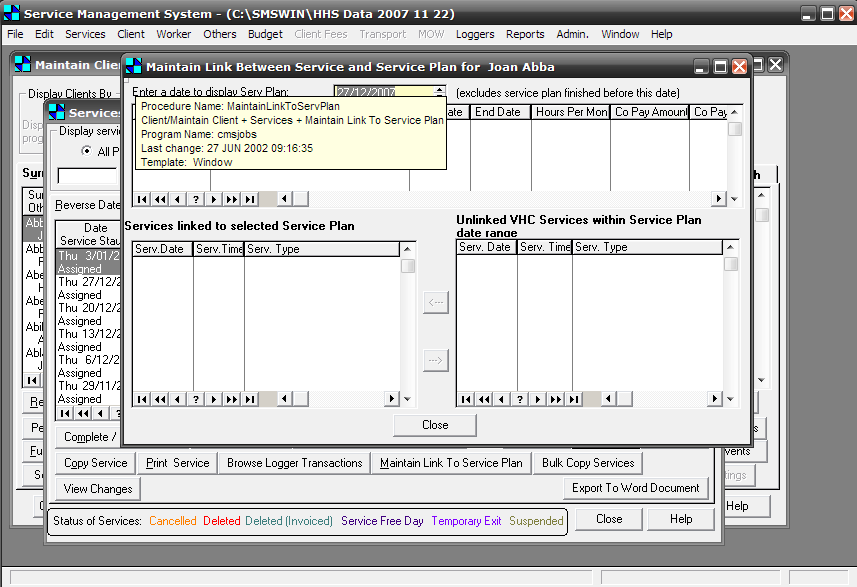
Balloon tip showing the procedure name, parameters, and navigation path . So you know exactly where your user is. (click to zoom)
How It Works
Simply add the template as a global extension. At runtime, every window gets a small flat button. Hover to see a balloon with the procedure name, parameters, menu navigation path, application name, and more. Press the button or its hot-key to copy everything to the clipboard . Your user pastes it into an email, and you have the exact diagnostic info without a single follow-up.
Paired with PrintWindow, the same identification info appears on printouts . So even paper records document where the data came from.
Design-time or run-time activation. Compatible with ABC and Legacy, single-DLL or multi-DLL.
Features
 One-click clipboard copy . User presses the button, diagnostic info goes to the clipboard, they paste it into an email to you. No more "what screen are you on?"
- Shows procedure name, full menu navigation path, procedure parameters, application name, date of last modification, template type, current path, and main file. Here's exactly what gets copied:
Procedure Name: DrawingsTabs
Demo/Drawings/Drawings - With Tabs + Change
Program Name: WIa6
Last change: 29 MAY 2006 11:50:16
Template: Window
Current path: c:\clarion\WindowID\WI_ABC_6_ENG - Selective runtime activation via .ini file . Enable for specific users or deployments only.
- Configurable action on button press: copy to clipboard, show message box (copyable with NeatMessage), or both.
- Customizable icon, title, and extra information fields.
- External translation file (.TRN) . English and Spanish included.
- Integrates with PrintWindow to add window identification info to every printout.
You can check the demo right now.
We are waiting for your comments!
The package includes a full installation program with both templates (ABC and Legacy), examples and documentation in printable PDF format. 100% source code included.
Bundle & Save
Support Pack (FullRecord + NeatMessage + PrintWindow + WindowID)
The complete support solution. Records your user file changes and messages. Print your user windows, and obtain precise information about what window your user is using. New!! Now help to fix your user's files on-site with FileTuner.
Save US$ 113 with this bundle!
Compatibility
FULL SOURCE INCLUDED


Secure payment via PayPal or bank transfer. View all payment options.
Notes:
Initial purchase price includes 1 year of revisions, upgrades and support.
Support is given for the last patch of each Clarion versions (5.5 up to 10).
If you have questions, we will be pleased to answer. Just contact us.
Not sure yet? Read what others say
"This was the best thing next the sliced bread. You have no idea how this is going to make my life easier. I have 8 app's in the market with over 3000 users. When bugs are reported, sometimes it is difficult to get the client to tell the support team what screen they are on. Now they can email a support report to us." - Raymond Dummer (South Africa)
"This is a great product which I highly recommend. I thought it would be most useful for our users, but have found it saves me heaps of time. I can always see exactly where I am in our software, which makes it easy to raise specific Change Requests. The tool is simple and effective and well supported by Jorge and his team as well." - David Groves - Alchemy Technology (Australia)
WindowID downloads

Upgrade required and new Serial number required if you purchased before May 21st 2013. You will receive them by email after purchasing.
Serial number required. You will receive them by email after purchasing.
Serial number required. You will receive them by email after purchasing.
Free download of compiled example.
Serial number and Maintenance code valid until 27 December 2007 required.
Serial number and Maintenance code valid until 5 January 2007 required.
Serial number and Maintenance code valid until 17/12/06 required.