









Zero-Effort Reporting. Print any Clarion window as a professional vector report . No code, no compromises.
Stop writing reports for every window. PrintWindow lets your users press a single hotkey to send any window . With all its tabs, scroll bars, and controls . Directly to your report previewer as a sharp vector-based printout. No code to write, no maintenance burden, no pixelated screenshots.
Add a single global extension to your application. That's it. Your users press the hotkey (PauseKey by default) on any window and instantly get a professional report. Each tab becomes a separate page. Scrolled content prints in full, auto-scaled to fit. Every control is reconstructed as crisp vector graphics . Not a bitmap screenshot . So the output scales without quality loss.
Need selective printing? A second global extension lets you add a dedicated Print button to specific windows instead of relying on the hotkey. Either way, you ship zero additional report code per window.
PrintWindow also supports high-resolution background replacement: supply your own graphics and it will swap low-resolution window backgrounds for print-quality ones automatically. Fine-tune exactly which controls appear, how they render (with or without borders, full color or B&W, shadows, headers/footers), and whether to use an image as a fill-in form background.
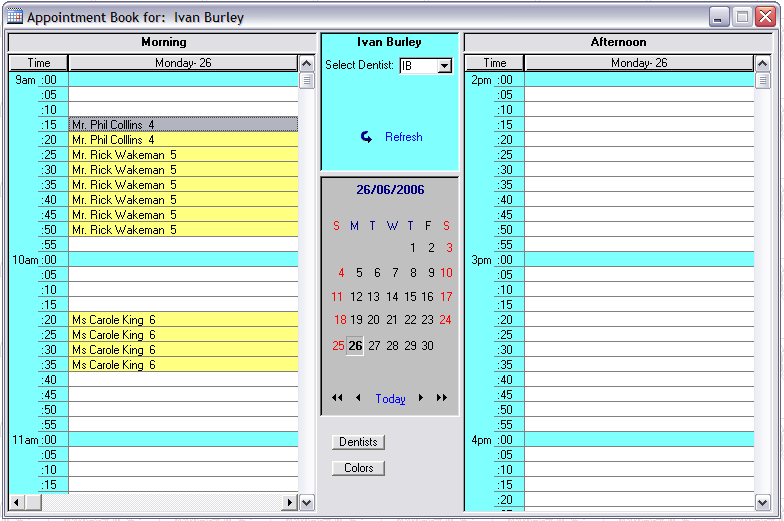
From a complex data-entry window to a polished report in one keystroke.
This window from the BST templates example program prints with all tabs, scroll bars, and controls preserved. (click to zoom)
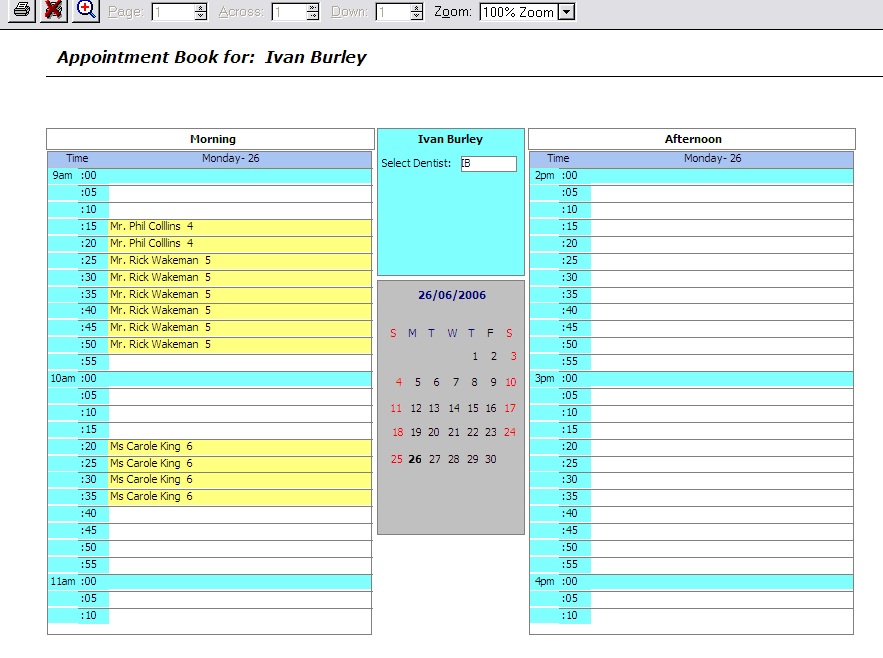
Vector output with the "no buttons" option active, shown in the standard Clarion previewer.
Every control is reconstructed as a true vector graphic . Scale it, export it, email it. No pixelation. (click to zoom)
Features
When you take a bitmapped "screenshot" to print, you get exactly what you see, but PrintWindow gives you several advantages:
-
 If the window doesn't fit on the screen (i.e. it uses scroll bars), it will fully print anyway, using as many pages as necessary.
 - A window with several tabs, will generate a multi-page report with a tab in each page (by default). You don't need to capture each tab separately.
- You can customize what controls you want to print on the window, therefore if some controls you don't want to be printed, you just select them in a dialog window.
- Auto scaling feature to print any window no matter its size. Fit to window, fit horizontal or fit vertical. Option to automatically center it horizontal and/or vertically. Option for real size printing or manual scale setting.
- Auto resize feature to print any form-like window avoiding distortion.
- You can also customize several aspects of what you are going to print, for example, entry fields with or without box, the whole print in black and white or at full color, some controls with shadows, headers and footers for the report, etc.
- Since you use the internal report generator, your window will end up in a vectorial WMF file, which you can shrink or enlarge without quality loss (as opposite to a screenshot, which is a bitmap by definition).
- It is far easier for your end user to just press a button and use his favourite previewer, than capture the screen and see how to print it.
- As it uses a regular report, you can send your window to the printer, to just the screen, to a pdf file, or to any kind of file your report system is capable of exporting to.
- Compatible with the standard Clarion, TinTools and IceTips previewers and CPCS report and previewer.
- When you change your window, the report will change automatically.
- Works together with WindowID to take the window information.
You can check the demo right now. Try pressing the hotkey (PauseKey) among the different procedures to see how the controls prints. You can check the template usage by reviewing the on-line reference. In the "Examples" chapter you can see some screenshots on how PrintWindow works.
We are waiting for your comments!
The package includes a full instalation program with both templates (ABC and Legacy), examples and documentation in printable PDF format.
Support Pack (FullRecord + NeatMessage + PrintWindow + WindowID + FileTuner)
The complete support solution. Records your user file changes and messages. Print your user windows, and obtain precise information about what window your user is using. New!! Now help to fix your user's files on-site with FileTuner.Save US$ 132 with this bundle!
FULL SOURCE INCLUDED
C6.3 up to C12


Secure payment via PayPal or bank transfer. View all payment options.
Notes:
Initial purchase price includes 1 year of revisions, upgrades and support.
Support is given for the last patch of each Clarion versions.
Not sure yet? Read what others say
"A -huge- feature is handling windows that have multiple tabs... you can configure it to print each tab on a separate page. Very cool and very easy to setup." - "...take a serious look at this product...recommended." - David Jung (USA)
"We develop a lot of screens with government forms (.gifs) as background images, one page per tab. Once the data is entered, users often want a printout to file for audit requirements, email a copy when referring the client to another organisation, take out to a client's for review etc. I no longer have to write a separate report for each screen. I just add the "Print" button to the bottom of each update form. Being able to use our own previewer means the report can be emailed, archived as pdf, printed etc." - "Have a look at this utility. You won't be disappointed. " - David Groves - Alchemy Technology (Australia)
"If anyone is considering this addon, quit thinking about it and just buy it. Combine this tool with HandyTools (or a qbe template) to allow a user to dynamically filter a browse and they've got a quick, easy, simple report (without bugging you). Fancy up the report a little with these new goodies (3D shadow effect), and it makes for happy users! On top of that, Jorge supports these templates quickly and efficiently. Recommended!" - Pete Harder (USA)
David Harms wrote a review on this product, in a Clarion Magazine Article. From the article: "PrintWindow isn’t a replacement for standard reporting, although for some quickie reports it comes close, and even surpasses standard reporting. If you need to duplicate any part of your screen’s appearance in a report, however, PrintWindow will rapidly pay for itself.". If you are a subscriber, please check the whole article. Rated 4 out of 5 stars!
PrintWindow downloads

Serial number required. You will receive it by email after purchasing. (Note, try your last serial code before purchasing a new one!)
Serial number required. You will receive it by email after purchasing.
Serial number required. You will receive it by email after purchasing.
Free download of compiled example (Compiled with Clarion 7.0).
Serial number and maintenance code valid until 30 March 2008 required.
Serial number and maintenance code valid until 6 September 2007 required.
Serial number and maintenance code valid until 28 May 2007 required.
Serial number and maintenance code valid until 22 April 2007 required.
Serial number required.